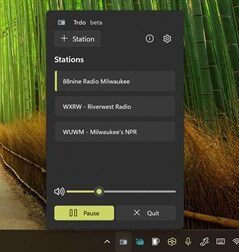
On October 13, 2025, an app quietly arrived in the Microsoft Store for a self-described “lightweight, elegant” radio player — one that lives in the system tray of a Windows-powered computer. Now, thanks to a blogger and word-of-mouth, this tiny internet hub for AM and FM stations in gaining greater notice. But, does it have legs?

That’s what the creators of TRDO hope it has, as it is available for download at no cost and with no subscription fees.
The goal? Replicating “the simplicity of your car radio” on a streamlined graphics-free platform that pulls audio stream URLs and presents them with ease.
“No scrolling through endless menus, no complicated interfaces—just reach out, press a button, and instantly switch between the stations you love,” TRDO promises in its download page.
TRDO comes courtesy of Joseph Finney’s “JoeFinApps” and at press time had six ratings. The app size is a mere 46.9 MB.
RBR+TVBR downloaded TRDO to a laptop computer using Windows 10 to try TRDO. Setup is fairly self-explanatory, as users must ensure that the TRDO icon is always visible in the system tray. This can appear alongside a button for Google Chrome, Microsoft Edge, or Spotify. However, upon installation, the button disappeared from the system tray after clicking a button on an introduction screen. As such, we searched for the app and then attempted to open it manually.
That didn’t work either, making a trial spin of TRDO impossible.
Was it because we were streaming a radio station already, via iHeartRadio’s web browser?
We attempted to launch the app a few more times. Nothing happened. So, we uninstalled TRDO and tried a second installation.
Nope … it would not open. So, we went back to streaming on iHeartRadio, or going to a radio station’s website directly.
It should also be noted that the app doesn’t exist in the App Store operated by Apple.
Yet, TRDO was accessible to MakeUseOf.com blogger Tashreef Shareef, who wrote about his use of the app on Friday (1/23). “I’ve started to listen to more radio (internet radio to be precise), thanks to a tiny system tray utility for Windows called Trdo,” he wrote. “It’s a free, open-source app that lets you add and listen to your favorite radio stations from the system tray, and it has made me fall in love with radio again.”
Shareef adds that TRDO app uses a WinUI 3 interface “that feels native to Windows 11,” remembers your last station and volume level, and shows song metadata when available.
Lastly, Shareef notes that, just maybe, TRDO was on our laptop all along.
“TRDO is still in active development, and it shows in a few places,” he writes. “The tray icon can be hard to see on Windows 11’s light theme as it uses a monochrome icon when stopped and a colored one when playing, but both can wash out against specific backgrounds. A white-outlined icon could aid in better visibility.”