

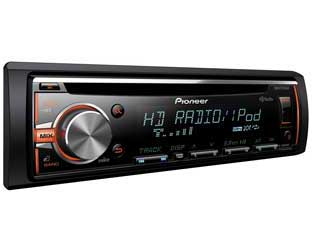
Pioneer Electronics introduced a smartphone app that enables your smartphone to act as a second screen for many of its single DIN 2016 CD receivers. Its demo video features several radio stations.
To use, connect the phone to the headunit with a USB cable and then access features through the Advance Remote Control app.
For those who don’t have a AVH or NEX unit, the app offers users the similar convenience of a touchscreen for basic functionality, but with a CD receiver, Pioneer tells RBR+TVBR.
Swipe and tap the phone to display detailed artist and track information, including album art from various music apps and music sources on phone. Listeners can also control basic commands like switching music sources, play/pause, skip, and shuffle/repeat.
The app is free to download from Google Play or Apple iTunes and is compatible with iPhone 8.0 or higher or Android 4.2 or higher.
The ARC app is currently compatible with DEH-X6800BT, DEH-X5800HD, DEH-X4800BT, DEH-X3800S, DEH-X3800UI, DEH-X2800UI, DEH X2800UI CD receivers and the MVH-X380BT CD-free receiver.
Here’s a video showing how to use the ARC app on the DEH-X5800HD CD
Receiver: http://www.pioneerelectronics.com/PUSA/Car/CD-Receivers/How+To+-+DEH-X5800HD+-+ARC+App
RBR+TVBR observation: The receiver chosen for the demo is an HD Radio unit. Radio owners may want to know the demo video shows users how to access radio stations through the app, as well as HD Radio multicast channels and iHeart stations, in addition to other music sources.