

It started as a direct-to-consumer newsletter platform with a subscription model. Today, Substack is a publishing platform that helps writers, podcasters, and creators build and monetize their work through audio and video, too.
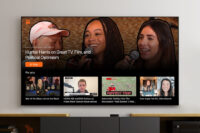
This explains the beta launch of an app now available on both Apple TV and Google TV from a platform targeting the content creator seeking a DIY way to share long-form video work.
In an announcement shared to its users Thursday (1/22), news of Substack TV was confirmed, providing a platform for “thought-provoking videos and livestreams” that Substack seems is “natural” — the television.
“That might mean watching Dolly Parton reflect on her showbiz journey, George Saunders read from his book, or Tina Brown interview leading figures in news and culture,” Substack notes.
For the creator community, which the RBR+TVBR Winter 2026 will explore upon its February 9 release following ISE 2026 in Barcelona, those who already publish video don’t need to do anything new— videos will automatically be available for subscribers who are signed in to the Substack TV app.
“This initial version of the TV app is focused on reliable, high-quality viewing, and we’ll be adding more features over time,” Substack notes. “We’re starting with the essentials and will keep improving it based on how people actually use it.”
At launch, Substack TV subscribers can:
-
Watch video posts and livestreams from the creators and publications they’re subscribed to
-
Browse a “For You” row that highlights videos from their subscriptions, plus recommended videos
-
Open a dedicated page for each subscription to explore more videos from a specific publication
Both free and paid subscribers can sign in to the TV app and begin using it today, with viewing access matched to their current subscription level. While paid content previews for free subscribers aren’t supported yet, Substack indicates that it plans to add them in a future update.
How does one find and view Substack videos on a TV? Search for “Substack” in the TV’s app store and download the app (Apple App Store for Apple TV, or the Apps section for Google and Android TV devices). Then, open the app on the television; a QR code will appear on the screen. Scan it witha phone or enter the URL manually to log in.
“Because this is an early version, some familiar Substack features aren’t available yet,” Substack notes. Forthcoming app updates will offer audio posts and read-alouds; search and improved discovery; previews of paid content for free subscribers; in-app upgrades to paid subscriptions; and sections for different shows from one publication.